
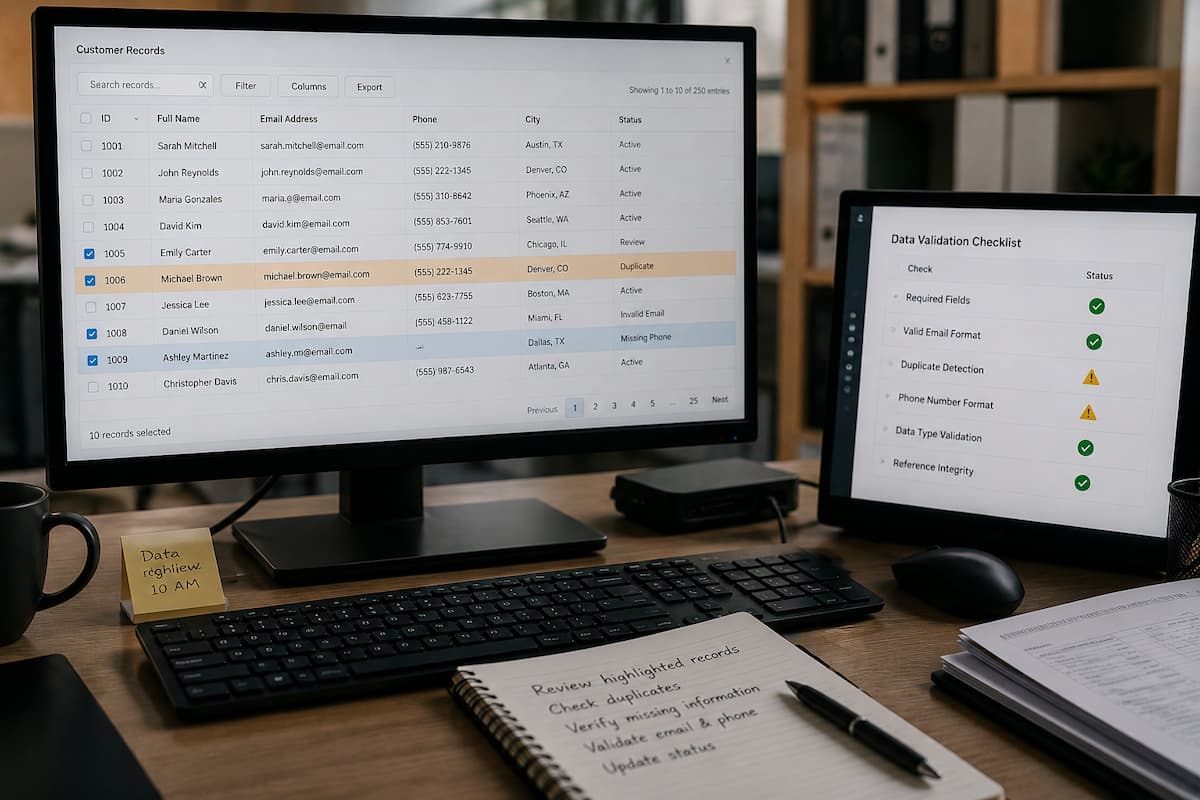
These are precisely the issues that data validation addresses. Validation refers to applying rules to check information before it is received, stored, or used. Some checks are simple, such as requiring a field to contain a number. Others involve relationships between records or business rules, determining whether a value is reasonable.
This article describes how data validation works, its importance, common validation techniques, where validation should be implemented, how to handle validation errors, and how to create effective validation rules without making the system unnecessarily complex.
Why Use Data Validation?
Data validation enables information systems to determine whether information meets their requirements. The goal is not to prove that every value is factually true, but to verify that the data complies with the rules the system deems applicable.
For example, employee IDs must be unique and mandatory. Product quantities must be integers greater than or equal to zero. Date fields must contain valid dates. Department references must point to an existing department.
Without these checks, errors could become the norm within the system’s data. If the system stores incorrect data, this data can be copied to reports, transferred to other programs, used in calculations, or incorporated into automated processes.
Validation is therefore closely connected to data quality. Good validation prevents many predictable problems before they become expensive cleanup tasks.
Tip: Start validation with the rules that protect the meaning, identity, and relationships of important records.
What Bad Data Can Cause
Bad data does not always cause an immediate failure. Often, the system continues working while quietly producing unreliable results. Such scenarios can make data problems particularly difficult to notice.
Imagine a reporting system that contains thousands of customer records. If some customers are listed twice, sales may appear higher or customer counts may be inaccurate. If you store dates inconsistently, monthly reports may place transactions in the wrong period. If product quantities are entered incorrectly, inventory calculations can become misleading.
| Data Problem | Possible Consequence | Useful Protection |
|---|---|---|
| Missing required identifier | Record becomes difficult to identify | Required-field rule |
| Duplicate identifier | Records become confused or merged incorrectly | Uniqueness constraint |
| Negative quantity | Incorrect inventory calculations | Range or check rule |
| Invalid date | Incorrect sorting or reporting | Date and range validation |
| Unknown customer reference | Broken relationship between records | Relationship validation |
The important point is that data errors can spread. A mistake made during data entry may eventually appear in several parts of an information system.
Common Types of Data Validation
Different types of information require different checks. A good validation system uses rules that match the purpose of each field.
Required-Field Validation
A required-field check makes sure important information is not left empty. An order might require an order number, while an employee record might require an employee ID.
This is one of the simplest validation methods, but it should be used carefully. Not every field needs to be mandatory. Making optional information required can create unnecessary problems for users.
Data-Type Validation
Data-type validation checks whether information is the expected type. A quantity may need to be an integer, a price may need to be numeric, and a date field should contain a valid date.
Using appropriate data types also helps databases and applications process information consistently.
Range Validation
Range validation checks whether a value falls within acceptable boundaries.
For example, a percentage might normally be restricted to values between 0 and 100. An inventory quantity might be required to be zero or greater.
Format Validation
Some information has a recognizable structure. Account codes, postal codes, dates, and other identifiers may require a particular format.
However, format rules should not be stricter than the actual requirement. Real-world information can vary more than developers expect.
Uniqueness Validation
Uniqueness validation prevents the same identifier from being assigned to multiple records when that identifier is supposed to identify one record.
For example, two employees should not normally share the same employee ID.
Relationship Validation
Information systems often contain related records. An order may belong to a customer, and an order line may refer to a product.
Relationship validation helps ensure that these references point to records that actually exist.
How to Create Useful Validation Rules
A validation rule should come from a real requirement rather than an arbitrary assumption. Before creating one, ask what the field means and how the information will be used.
- Identify the purpose of the field. Know what the value represents.
- Choose the appropriate data type. Decide whether it should be text, a number, a date, or another type.
- Determine whether it is required. Do not make optional information mandatory without a reason.
- Define acceptable values. Establish ranges, formats, or permitted choices when necessary.
- Consider uniqueness. Decide whether duplicate values are allowed.
- Check related records. Identify dependencies between fields and tables.
- Decide how failures should be handled. Users should know what needs to be corrected.
Suppose a system stores the number of items ordered. A useful requirement might be that the value must be a whole number greater than zero. That requirement can then be implemented through appropriate application logic or database rules.
Expert tip: Write important validation requirements in plain language before turning them into technical rules. It makes misunderstandings easier to find.
Real-World Examples of Data Validation
Data validation appears in many ordinary systems, even when users never consider it.
Customer Registration
A registration system might require a username and account identifier. It can check that required values are present, that fields follow expected formats, and that an identifier is not already assigned.
Online Orders
An order system may check that the selected product exists, the quantity is valid, and the customer record can be identified. These checks help prevent incomplete or contradictory orders from entering the main transaction system.
Inventory Systems
Inventory software commonly needs reliable quantities, product identifiers, and locations. A validation rule can prevent obviously invalid quantities while relationship checks can ensure that a product reference points to an actual product.
Employee Systems
An employee system may validate employee IDs, department references, dates, and other fields. Preventing duplicate employee identifiers is particularly important because many other records may depend on that identifier.
| System | Example Validation | Purpose |
|---|---|---|
| Customer database | Unique customer ID | Identify records reliably |
| Inventory system | Quantity cannot be negative | Protect stock calculations |
| Order system | Product reference must exist | Maintain record relationships |
| Employee system | Employee ID is required | Prevent unidentified records |
Front-End and Back-End Validation
Validation can occur at several points in an information system. Two common locations are the front end and the back end.
Front-End Validation
Front-end validation happens in the interface that users interact with. For example, a form can immediately tell someone that a required field is empty.
This makes data entry easier because the user can fix an error before submitting the information.
Back-End Validation
Back-end validation occurs after information reaches the application server or another trusted system component.
This layer matters because not every record comes from a normal user interface. Data may arrive through an API, mobile application, scheduled import, integration, administrative tool, or automated process.
For that reason, front-end validation should not be treated as the only protection.
Warning: If an important rule exists only in a web form, another application may bypass it completely.
How Databases Help Validate Data
Databases can provide another important layer of data protection. Relational database systems commonly support constraints that restrict what users can store and how records can relate to one another.
For example, a NOT NULL constraint can prevent a required field from being empty. A UNIQUE constraint can prevent duplicate values. A primary key can identify records, while a foreign key can protect relationships between related tables. A CHECK constraint can restrict values according to a defined condition.
These controls are useful because databases may be accessed by more than one application. A rule enforced at the storage layer can continue protecting the data even when different applications interact with the same database.
Database constraints do not replace application-level validation. A database may correctly reject invalid information, but the application still needs to explain the problem to the person or process that submitted it.
Using both levels appropriately provides a stronger design: the application can provide helpful feedback, while the database can enforce important integrity rules.
Validating Imported and Integrated Data
One of the most overlooked sources of bad records is data imported from somewhere else.
A company may receive information through spreadsheets, CSV files, APIs, older databases, partner systems, or third-party software. The source system may use different field names, formats, rules, or assumptions.
Simply importing the information without checking it can introduce thousands of bad records at once.
A Safer Import Process
- Review the structure of the incoming data.
- Check that required fields are present.
- Validate data types and formats.
- Check ranges and permitted values.
- Look for duplicates.
- Check references to related records.
- Separate invalid records for review.
- Load approved records into the main system.
- Keep a record of rejected or corrected entries.
A staging area can be useful for larger imports. Instead of sending incoming data directly into production tables, the system can inspect the records first.
This approach makes it easier to identify problems before they affect live information.
How to Handle Validation Errors
Rejecting incorrect information is only half of the job. A system should also make validation failures understandable.
Consider the difference between these two messages:
Poor: Invalid input.
Better: Quantity must be a whole number greater than zero.
The second message gives the user a clear path toward fixing the problem.
Error messages should normally identify the affected field and explain the expected value without exposing unnecessary technical details.
Keep Technical Details Separate
Developers and administrators may need detailed logs to investigate validation failures. Regular users usually do not need database error messages or internal system information.
A good design can therefore provide a simple explanation to the user while recording additional technical details in a secure system log.
Common Data Validation Mistakes
Making Rules Too Strict
Overly strict validation can reject information that is actually legitimate. A rule should match a real requirement rather than an assumption about how information “should” look.
Relying Only on Front-End Checks
Client-side checks improve the user experience, but other sources can bypass them. Important rules should also be protected at a trusted server or database layer when appropriate.
Forgetting Existing Records
Adding a new validation rule does not automatically repair old data. Existing records should be reviewed before applying important new constraints.
Ignoring Boundary Values
Testing only obviously invalid values is not enough. If a rule allows values from 1 through 100, test 1, 100, 0, and 101.
Using the Same Rule Everywhere
Different fields have different meanings. A rule that makes sense for an employee ID may be inappropriate for a person’s name or address.
Failing to Review Rules
Business processes change. Validation rules should change with them when necessary.
Best Practices for Data Validation
A reliable validation strategy does not have to be complicated. The following practices provide a strong foundation.
- Define requirements before writing validation logic.
- Use appropriate data types.
- Make genuinely required information mandatory.
- Use range checks where boundaries have real meaning.
- Protect identifiers that must remain unique.
- Validate relationships between records.
- Check data received from external systems.
- Use database constraints for important integrity rules.
- Provide clear error messages.
- Log important validation failures.
- Test both normal and unusual input.
- Review rules when business requirements change.
It is also useful to measure repeated validation failures. If users repeatedly enter the same invalid value, the problem may not be simply user error. The form, instructions, field design, or underlying requirement may need improvement.
Best practice: Treat repeated validation failures as useful feedback about the system, not just as mistakes made by users.
Maintaining Validation Rules Over Time
Validation is not something that can be designed once and then forgotten. Information systems evolve. New applications are connected, old processes are removed, business rules change, and data requirements become more complex.
Whenever a significant system change is planned, validation rules should be reviewed as part of the change.
For example, a company might have previously allowed only one type of product classification. If the business later introduces several classifications, an old validation rule may reject legitimate new records.
Documentation also matters. Teams should know what a validation rule is supposed to protect and why it exists. Otherwise, a future developer may remove a rule simply because its purpose is unclear.
Review Questions
- Is this rule still required?
- Does it match the current business process?
- Are legitimate records being rejected?
- Are invalid records still getting through another entry point?
- Are users receiving understandable error messages?
- Do automated imports follow the same important rules?
Data Validation Checklist
Before introducing a new information system or major data workflow, use this checklist:
- Identify the purpose of every important field.
- Define the expected data type.
- Identify genuinely required fields.
- Define acceptable ranges and values.
- Determine which fields must be unique.
- Document relationships between records.
- Check all major data-entry paths.
- Validate API and imported data.
- Use database constraints where appropriate.
- Create clear validation error messages.
- Test boundary and unusual values.
- Review existing records before introducing new restrictions.
- Monitor repeated validation failures.
- Document important validation rules.
- Review rules after major system or business changes.
Conclusion
Data validation is a simple yet crucial step in the development of dependency-based information systems. It prevents data loss, corruption, duplication, out-of-scope errors, and broken links, thereby ensuring the reliability of system data.
The best approach is not to create as many rules as possible, but to identify rules that protect the meaning and authenticity of critical data. Verify that required fields, data types, ranges, formats, uniqueness, and relevance are correct.
Validation should be performed whenever data is entered into the system. While web forms can carry out effective checks, information can also be added via APIs, imports, integrations, and other applications. This means that certain critical integrity standards may also need to be enforced at the server or database level.
Finally—and equally importantly—remember that validation is an ongoing process. Systems adapt to changing business needs, and new data sources frequently come online. As the system evolves, maintaining reliability becomes easier by reviewing validation rules, testing edge cases, closely monitoring for errors, and promptly removing obsolete records.
Validation is an effective security mechanism that offers better protection for data and users when it is based on actual needs rather than arbitrary constraints.
Frequently Asked Questions
What is data validation?
Data validation refers to checking data before it is processed, stored, or received to ensure it meets specific criteria. These rules guarantee that the information exists, is of the correct type, falls within acceptable limits, is properly formatted, is unique, and is correctly linked to other records. Validation is a technique that helps prevent potential data errors, but it cannot guarantee that every value is 100% correct.
Why perform data validation in information systems?
Typically, the same data is replicated across multiple databases, reports, workflows, and applications. Consequently, incorrect records can have consequences that extend far beyond their storage location. Validation can prevent the spread of many errors—many of which are predictable. It can also reduce the amount of manual data cleanup required later and help companies maintain more accurate data.
Is data validation the same as data cleansing?
No; data validation primarily involves checking whether data complies with specific rules, usually before the data is added to an existing dataset. Data cleansing can resolve existing issues such as duplicate data, incorrect formats, incomplete data, or inconsistent records. The two processes complement each other: validation prevents errors at the source, while data cleansing resolves problems that have already occurred.
Does validation guarantee the accuracy of information?
No. A value can be valid yet incorrect. Validation checks whether information meets established standards; for example, a correctly formatted phone number might belong to the wrong person. Therefore, validation should be viewed as part of a holistic approach to improving data quality—one that also encompasses validation, auditing, monitoring, and remediation.
Should validation take place at the application level or the database level?
Many processes involve both levels. Application-level validation can provide rapid, intuitive feedback. Database constraints define critical integrity standards, regardless of which application generated the data. This depends on the system architecture. However, if only the user interface is securely protected against critical data issues, other access points remain vulnerable to attacks.
How should errors in imported data be handled?
Ideally, invalid imported records should be detected before being added to a trusted dataset. A test environment allows you to check newly imported information, ensure correct formatting, detect duplicates, validate links, and isolate problematic entries. Depending on the specific circumstances, records can be corrected, deleted, or flagged for manual review. Rejected records also help identify recurring issues.