
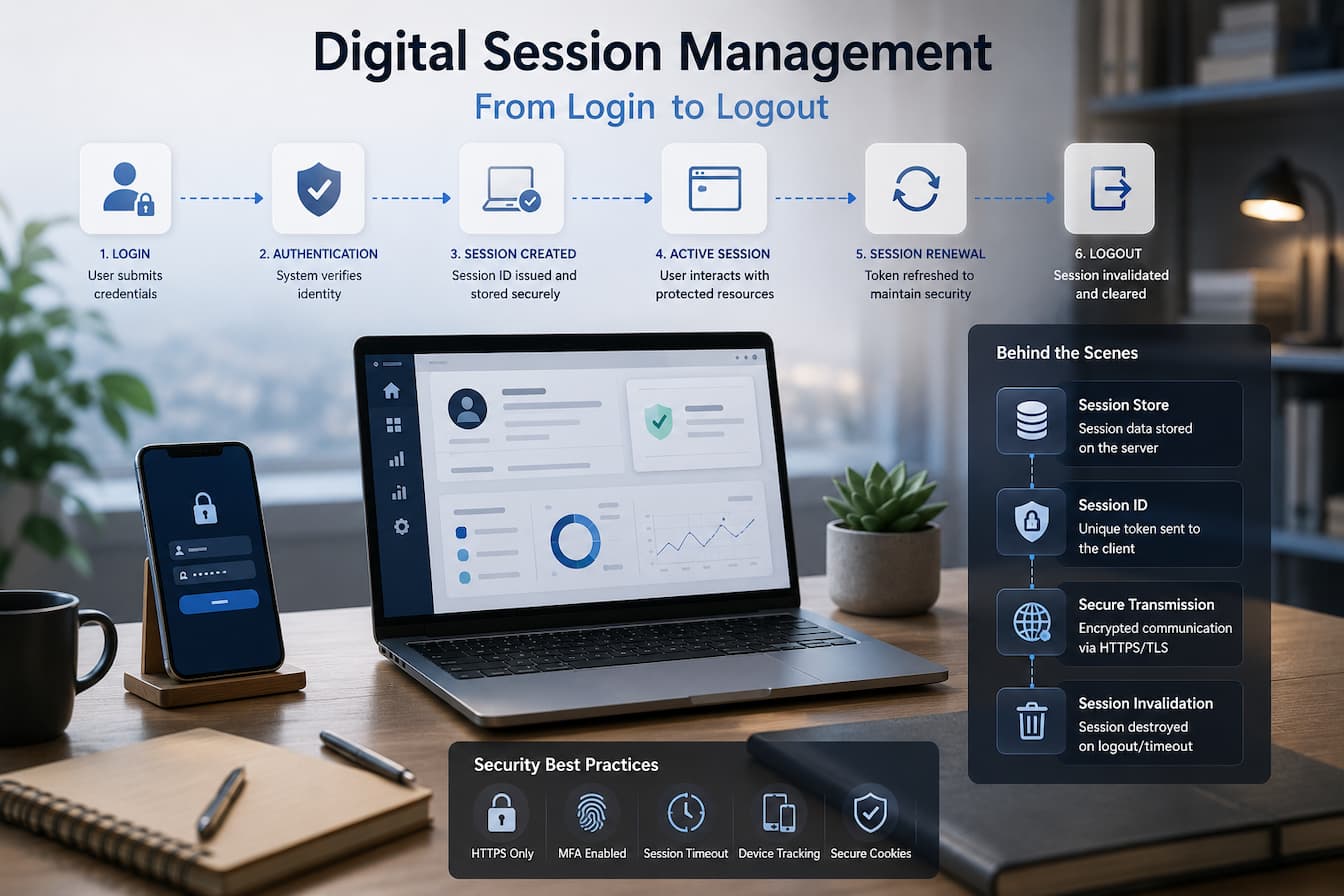
Logging in starts the application, but this is only the beginning of a long interaction. Once access is granted, the application needs a reliable way to detect the user’s status while they view pages, open new features, submit forms, or return after a short absence. Even the simplest tasks become frustrating when users must enter their login credentials for every action. On the other hand, permanent authentication for every visitor entails security risks.
Session management balances these conflicting needs. It enables applications to remember when a user has been authenticated and to restrict, monitor, and revoke trust as needed. Instead of asking “Who are you?” every time a page loads, the application asks: “Has this user established a valid session, and is that session still trusted?” This seemingly simple technology forms the basis of modern digital platforms. Banks, streaming applications, cloud software, online stores, healthcare portals, and business systems all use session management to ensure the continuity and security of service delivery.
Logins Create More Than Access
In addition to verifying usernames and passwords, users typically perform many other actions when logging in. Authentication services verify the user’s identity, but the application creates a session to represent a verified relationship between the user and the platform. Instead of storing the user’s password, the application generates a unique session ID based on the authentication status, access rights, login time, device attributes, and other interaction data. This session is used for subsequent requests, not for authentication.
This separation is crucial. A session persists throughout the entire authentication process. If the application relies on repeated authentication, every page request becomes resource-intensive and cumbersome. Adding a session layer allows the platform to quickly identify trusted users while avoiding the need to manage sensitive login credentials.
Connect Every Request to the Right Session
After logging in, the browser sends multiple requests to the application. These requests include opening dashboards, viewing reports, adjusting account settings, and downloading content. Without a session mechanism, the server would treat every request as a new visitor.
With session management, every request can contain information that links it to an authenticated session. The application checks this information before processing the request to verify the session and determine permissions. Users go through hundreds of such processes during a session. These continuous checks are invisible to the user, ensuring the consistency of the application and preventing unauthorized access to secure resources.
Common Session Data
Sessions contain or refer to information that helps the application manage interactions, such as:
- Unique session ID. Authentication status.
- User credential.
- Role or permission.
- Session creation time.
- Last active time.
- Security settings of the active session.
Although platform content varies, the goal is to store sufficient data to distinguish trusted requests without storing sensitive data.
Sessions Must Change with User Activity
Some interactions are riskier than others. Reading public documentation is very different from transferring money, changing security settings, or performing authorization management. Therefore, modern applications handle sessions dynamically. A session earlier in the day might be suitable for browsing the web, but requires additional authentication for critical operations. Even if the user is not logged out, some platforms require user authentication when changing passwords, updating recovery details, or performing high-value transactions.
Application security has been improved thanks to this technology. Session management enables applications to adjust their security level based on the severity of the request, rather than assuming that authentication from hours ago is reliable for all operations.
Multiple Devices Have Sessions
Modern consumers rarely use just one computer to access all digital platforms. For example, they use a desktop computer for work, a tablet for business trips, and then check notifications on their smartphone. Each device has its own independent application connection, which is typically managed in the form of sessions.
This decoupled design improves security and flexibility. Ending a session on one device does not necessarily affect normal operation on another device, and suspicious activity on one device can often be handled without interrupting other sessions. Many online services offer dashboards displaying ongoing sessions, allowing users to view their login location and terminate unnecessary sessions. Modern identity and application platforms therefore manage not only business systems but also multiple concurrent sessions.
Sessions Do Not Last Forever
Digital sessions have a limited lifespan. Even if a user leaves their browser open, the program eventually runs the risk of security issues because it continues to rely on inactive sessions. Session expiration mechanisms mitigate these risks while simultaneously ensuring a better user experience for legitimate users. Different platforms employ different policies depending on the sensitivity of their services. Forums may allow sessions to continue for longer periods because the consequences of unauthorized access are relatively minor.
However, online banking platforms may require shorter periods of inactivity and stricter re-authentication before they permit sensitive transactions. Session termination mechanisms require a trade-off, not a standard solution. The goal is to limit unauthorized access while simultaneously preventing the application from becoming unusable due to frequent authentication.
Session Refresh Ensures Prolonged Activity
Imagine using a cloud-based platform all afternoon. Logging out every 30 minutes would impact productivity, but keeping a session open for hours might not be the best security practice.
Many applications refresh sessions while users are actively engaged. The platform updates trusted session information during the user’s interaction, rather than treating the session as a fixed state from login to logout. If the user remains active and uninterrupted, the system limits the validity of an old session ID. Some systems generate new session IDs after a successful login or significant changes to account security. Refreshing session information reduces the risk that old identities are considered trustworthy for too long.
Events that Can Change Active Sessions
Sessions can be changed or re-evaluated for various reasons.
- The user logs in from a new device.
- Security settings have been changed.
- The password or access key has been changed.
- Multifactor authentication has been completed.
- Long-term inactivity detected.
- The application has detected unusual account activity.
- The user has used a sensitive feature.
Sessions are adjusted to changing circumstances, rather than being handled uniformly for all requests.
Proactive security process: Logout
Logging out may seem simple, but it actually involves several synchronized operations in the background. In addition to closing visible pages, the application terminates trust relationships that previously allowed unauthenticated requests.
Depending on the platform, logging out can invalidate the current session ID, remove temporary authentication data, notify connected services, and clear locally stored session data from the browser or application. These operations reduce the risk that a user can use trusted session data after leaving the website. Logging out is crucial for shared or public devices. Properly terminating a session prevents the next user using the same browser from inheriting an authenticated connection.
Extensive Session Management in Distributed Systems
Modern applications typically consist of multiple web servers. Before a user request receives a response, it can pass through multiple stages, including identity services, application servers, APIs, cloud storage platforms, payment services, and notification systems. In this distributed environment, maintaining consistent sessions requires collaboration, rather than assuming that each component can identify the user independently.
Applications often use a centralized identity or session infrastructure to share reliable session information within the platform, rather than authenticating separately at each service. These components can consistently identify authenticated users while simultaneously implementing their respective access controls. As companies embrace microservices and cloud-native architectures, coordinating session management is becoming increasingly important, as customers expect a consistent user experience from numerous independent systems.
Authentication and Session Management Compared
| Authentication | Session Management |
|---|---|
| Verifies a user’s identity | Maintains trusted interactions after authentication |
| Usually occurs at sign-in | Continues throughout the user’s activity |
| Confirms who the user is | Confirms the user’s authenticated session remains valid |
| Often involves passwords, passkeys, or biometrics | Relies on session identifiers and ongoing validation |
| Ends once identity has been verified | Ends when the session expires or the user logs out |
Session Management Connects Security With Usability
Modern digital platforms rely on session management because authentication alone cannot provide the continuous interaction users expect. Once authenticated, a session offers a structured way to maintain trust, assess ongoing activities, and adapt security decisions to changing circumstances. Sessions enable applications to identify legitimate users across hundreds of independent requests without having to repeatedly show login credentials or disrupt normal operation.
As cloud services, mobile applications, and distributed systems continue to evolve, session management will remain one of the invisible technologies shaping daily digital experiences. Users rarely think about it when browsing websites or applications, but it coordinates every authentication interaction in the background, from granting access to intentionally or automatically terminating the session.
FAQs
1. Is a session the same as logging in?
No. Logging in verifies a user’s identity, while a session keeps that trust relationship active during subsequent interactions with the application.
2. Why do some websites require users to log in again after a period of inactivity?
Applications often let inactive sessions expire to reduce the risk of unauthorized access by unattended devices or sessions that remain open for too long.
3. Can a user log in on multiple devices simultaneously?
Yes. Many digital platforms allow users to create independent sessions on different devices, each of which can be managed separately. Users can typically view and end these sessions via their account settings.
4. Why is re-authentication required for some actions, even after logging in?
Applications sometimes require additional verification before users can perform highly sensitive actions (such as changing account details or approving important financial or administrative actions). This provides extra security without requiring users to log in again for every routine action.